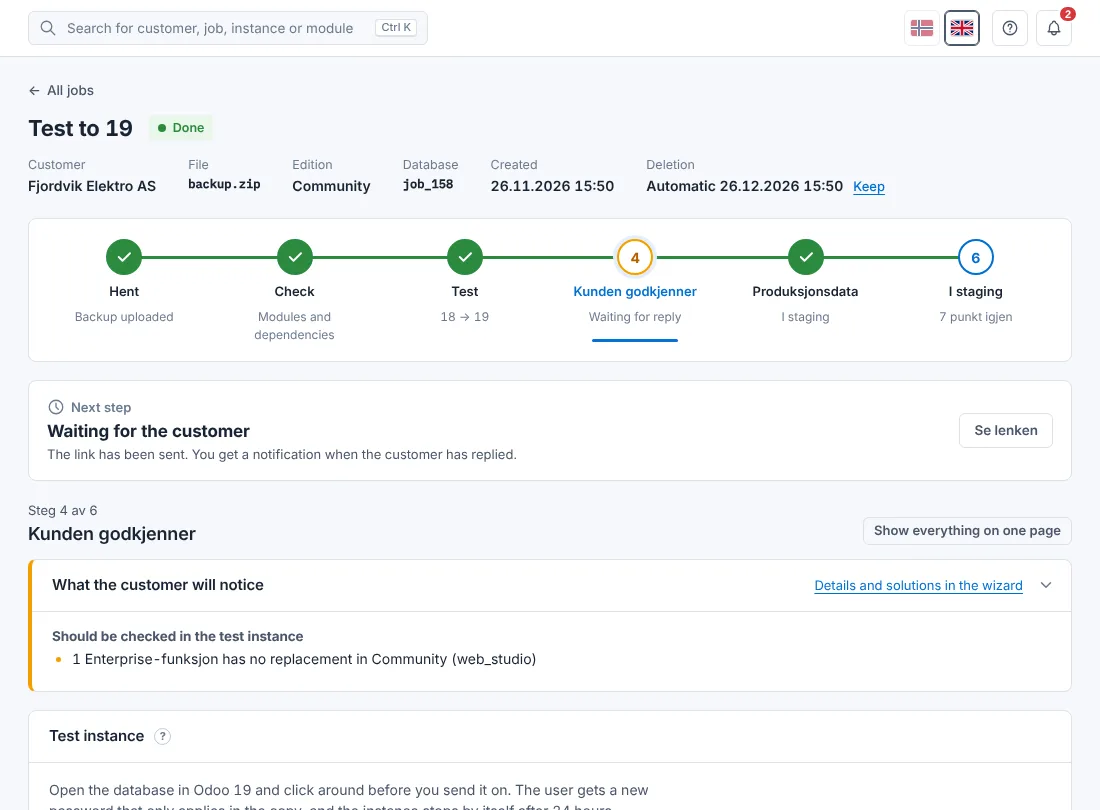
The job page is a wizard: it shows one step at a time and opens at the step the job is in. The step line shows how far the job has come: a green check is done, a red exclamation mark is an error, a blue ring is where the job is now, and a blue line below shows which step you are looking at.
- Click a step in the line to see it, or use ← previous and next → at the bottom.
- Next step at the top always says what you should do, with a button that takes you straight there.
- The steps Production and After the switch are on the production job; the line takes you there.
- Show everything on one page shows the whole job together, with shortcuts to the parts. The choice is remembered.
This is in each step: Fetch: connection, status and log from the import. Check: before you upgrade, module check, the wizard and starting the test. Convert (Enterprise databases only): keep Enterprise or convert to Community. Test: log, accounting check and data before and after. The customer approves: test instance and customer link. Production: the production job and upload. After the switch: the checklist.