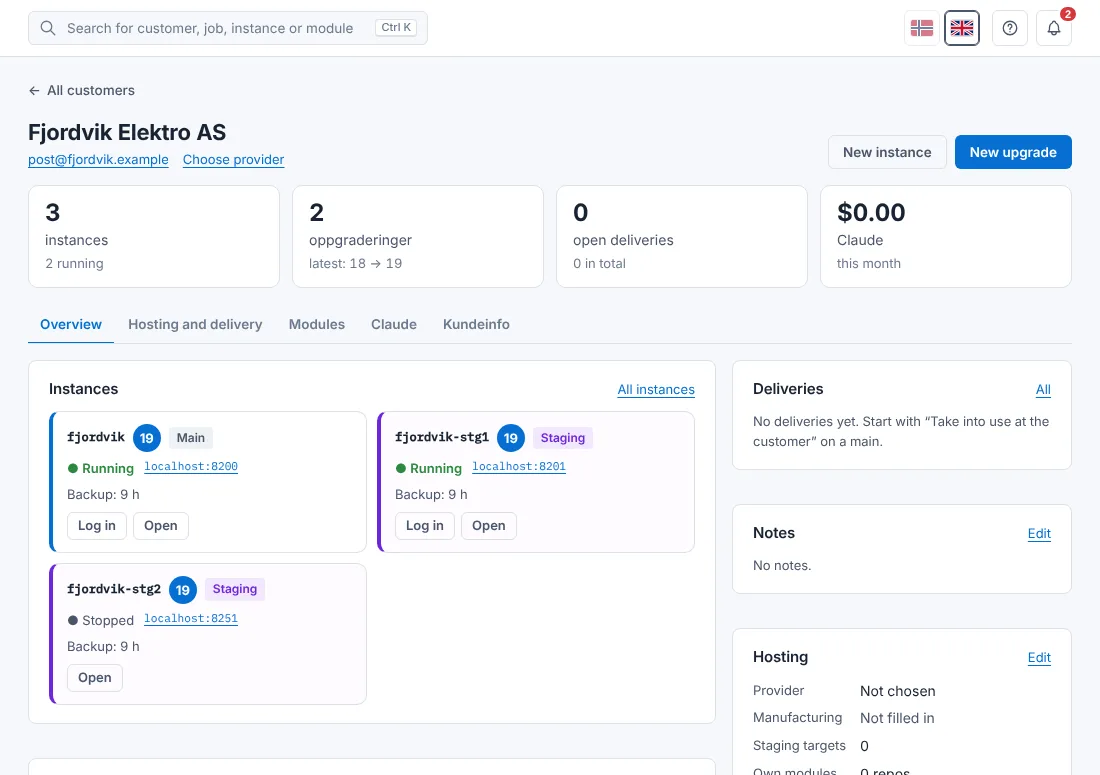
The customer page opens with an overview: key figures at the top (instances and how many are running, upgrades, open deliveries and Claude cost this month), the customer's instances as cards with main and the stagings together, the latest upgrades, the deliveries, notes and hosting. “New instance” and “New upgrade” fill in the customer by themselves. The settings are in tabs, and each tab is saved separately:
- Hosting and delivery: provider, the address of production and places to upload to. The instructions for the provider are under “Show the instructions”.
- Modules: the customer's own repos, the delivery repo with the read access, and the porting helper. If you have transferred the delivery repo to the customer, write the new address there. “Forget the repo” makes the panel stop using it, without deleting it on GitHub.
- Claude: cost per month, split by who pays (your account, the customer's workspace on your account, or the customer's own Anthropic account), the customer's API key, and which model is used for chat and for module porting for exactly this customer. “As in Settings” follows what you have chosen for everyone. Who paid is stored for each call, so the history is correct even if the key is changed. Customer info: name, contact, notes and the checklist the customer ticks.
- Hosting: which provider the customer uses and the address of Odoo. Filled in by itself when you fetch via the agent.
- Own modules: one git repo per line. The panel fetches the right branch for each version. Use {version} if the branches are named something else, for example https://github.com/company/modules {version}-prod.
- Places to upload to: one target per row with name, address, type (Staging/test or Production) and optional database name. The panel only uploads to Staging/test. Mark production as Production, and it is blocked. ssh:// uploads without database manager.
- Checklist for the customer: the points in the approval.
- The porting helper on the right runs odoo-module-migrator on a whole repo and creates a new branch.