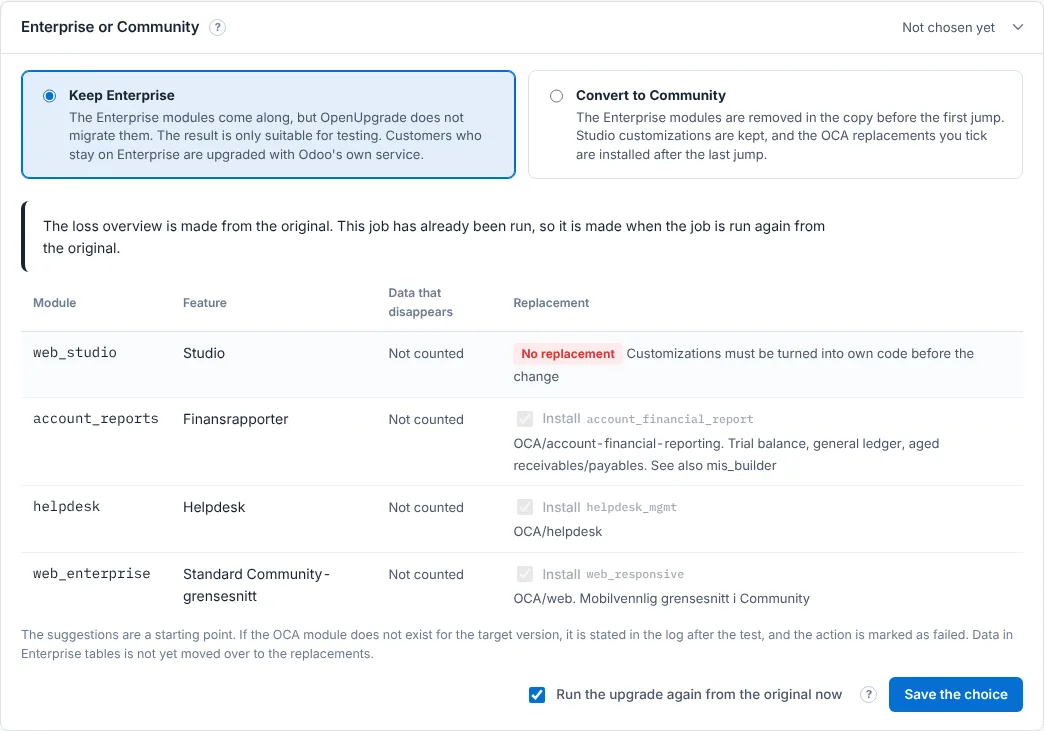
If the database is Enterprise, the job gets a step of its own, Convert. There you choose whether the customer keeps Enterprise or moves to Community. Everything happens on the copy, and the choice follows along in the recipe for the production upgrade.
- What disappears is counted from the original when the backup is fetched: rows in tables and values in fields that only the Enterprise modules own. Click the number next to a module to see which.
- Also removed: own modules or third-party modules that depend on an Enterprise module cannot remain alone. If they are to be kept, the dependency must be removed in the code.
- Studio: own fields, screens and actions made in Studio are detached and come along. Studio fields on Enterprise models and views that build on Enterprise views disappear with them.
- Replacements: tick the OCA modules to be installed after the last jump. The repo is fetched automatically. If the module does not exist for the target version, it is stated in the log, and the action is marked as failed.
The Enterprise modules are removed before the first jump. Odoo uninstalls them from its own registries, so the Enterprise code is not needed. The accounting check afterwards shows whether balances and entries are the same. Data in Enterprise tables, for example helpdesk tickets, is not yet moved over to the replacements. The customer sees on the customer page what disappears and what is replaced.
If the job has already been run, it must be run again from the original for the choice to apply. The panel does that for you if you leave the tick in place.